17 comprehensive container security best practices for 2026
The adoption of containers continues to grow, so you need to implement container security best practices now to ensure that malicious actors can’t use them as an initial vector of attack.
%201.svg)



Container technologies have become mainstream and are present everywhere. The percentage of organizations using containers for production applications increased to 56% in 2025 from 41% in 2023, according to the 2025 CNCF annual survey.
Meanwhile, 82% of container users deploy Kubernetes in production and 66% of organizations use K8s for generative AI workloads.
As container adoption grows, so too do attacks targeting them. Keeping containers secure remains a challenge due to their short-lived nature. 70% of containers live for five minutes or less, which makes investigating anomalous behavior and breaches extremely challenging.
One of the key points of cloud security is addressing relevant container security risks as soon as possible. Doing it later in the development lifecycle slows down the pace of cloud adoption, while raising security and compliance risks.
Container security can be applied at each of the different phases: development, distribution, execution, detection, and response to threats.
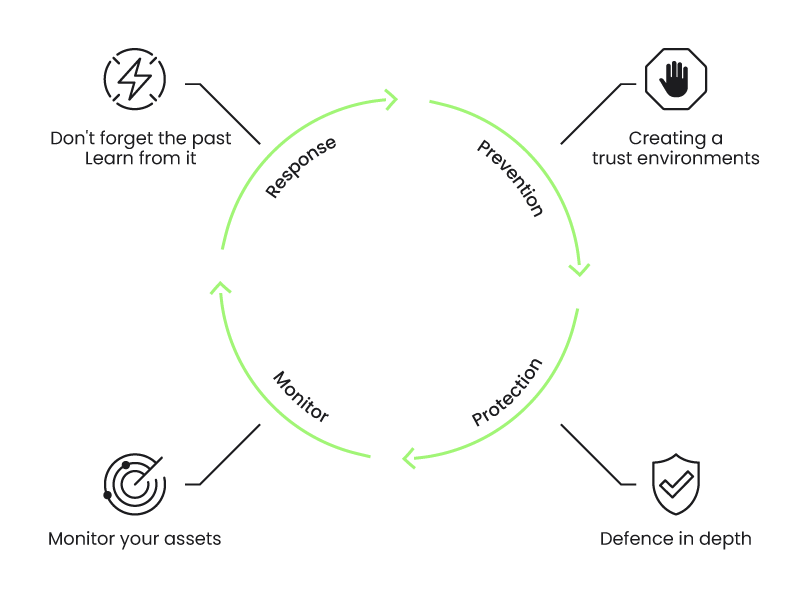
Follow these 17 container security best practices to keep your containers protected from threats, vulnerabilities, and weaknesses. Container security involves:
- Prevention.
- Protection.
- Detection.
- Response.
Prevention: 8 steps for shift-left container security
Before your application inside a container executes, you can start applying a few different container security techniques to prevent threats.
The software supply chain has become a top entry point for cyber threats in recent years. Modern businesses routinely depend on third-party applications, dependencies, and packages, and there have been a number of major security incidents where threat actors exploited the supply chain.
Prevention and applying container security during development and distribution of container images will save you a lot of trouble, time, and money with minimal effort.
1. Integrate code scanning at the CI/CD process
Security scanning is the process of analyzing your software, configuration or infrastructure, and detecting potential issues or known vulnerabilities. Scanning can be done at different stages:
- Code.
- Dependencies.
- Infrastructure as code (IaC).
- Container images.
- Hosts.
- Cloud configuration.
Let's focus on the first stage: Code. Before you ship or even build your application, scan your code to detect bugs or potentially exploitable code (a new vulnerability).
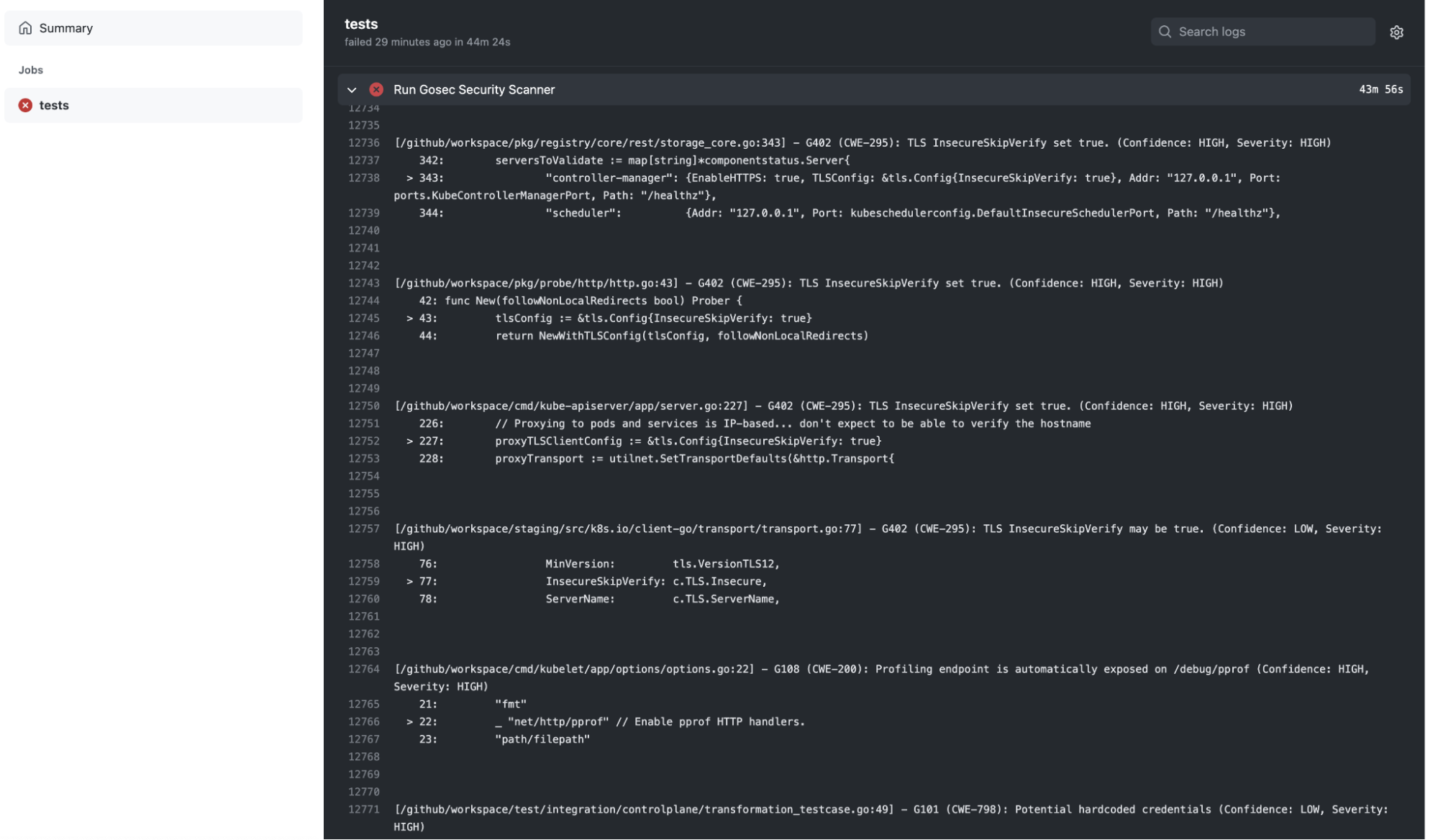
For application code, you can use a tool for static application security testing (SAST) to scan for vulnerabilities and other issues. There are also open source SAST tools like sonarqube, which provide vulnerability scanners for different languages, gosec for analyzing go code and detecting issues based on rules, linters, etc.
You can run SAST at the developer machine, but integrating code scanning tools in the CI/CD pipeline can make sure that a minimum level of code quality is assured. For example, you can block pull requests by default if some checks are failing.
A Github Action running gosec:
name: "Security Scan"
on:
 push:
jobs:
 tests:
   runs-on: ubuntu-latest
   env:
     GO111MODULE: on
   steps:
     - name: Checkout Source
       uses: actions/checkout@v2
     - name: Run Gosec Security Scanner
       uses: securego/gosec@master
       with:
         args: ./...
2. Reduce external vulnerabilities via dependency scanning
Using code from external dependencies means you could be including bugs and vulnerabilities in your application.
Perform dependency scanning to analyze third-party dependencies, libraries, etc. for outdated or vulnerable code.
Tools that offer software composition analysis (SCA) capabilities can be used to identify third-party dependencies. Package management tools, like npm, maven, go, etc., can match vulnerability databases with your application dependencies and provide useful warning.
For example, enabling the dependency-check plugin in maven requires just adding a plugin to the pom.xml:
<project>
<build>
<plugins>
...
<plugin>
<groupId>org.owasp</groupId>
<artifactId>dependency-check-maven</artifactId>
<executions>
<execution>
<goals>
<goal>check</goal>
</goals>
</execution>
</executions>
</plugin>
...
</plugins>
...
</build>
...
</project>
And every time maven is executed, it will generate a vulnerability report:
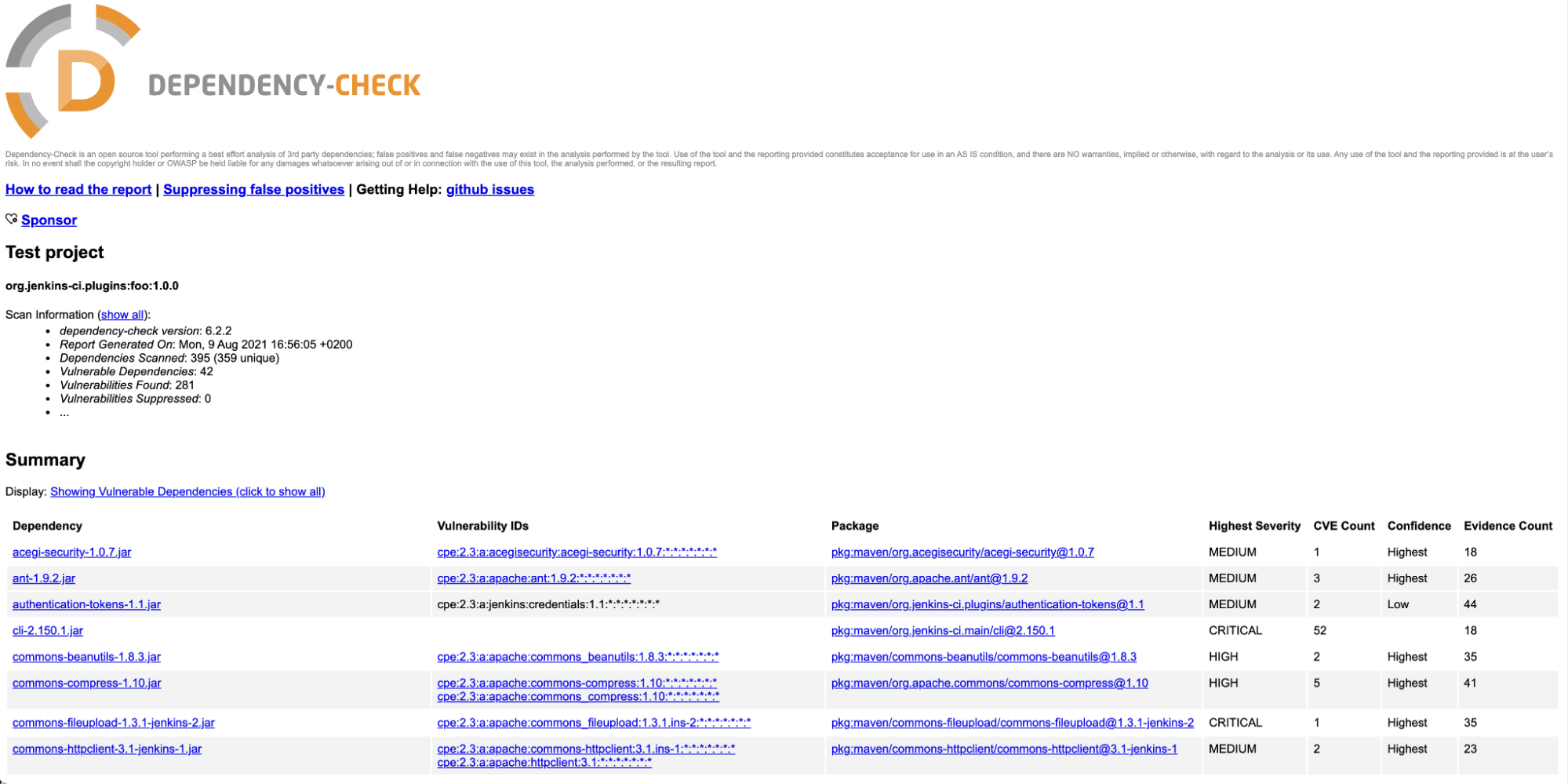
Avoid introducing vulnerabilities through dependencies by updating them to newer versions with fixes.
Be aware that waiting to scan dependencies until after the application is built will result in less accurate dependency scanning results. This is because some metadata information is not available, and it might be impossible for statically linked applications like Go or Rust.
3. Use image scanning to analyze container images
Once your application is built and packaged, it is common to copy it inside a container with a minimal set of libraries, dependent frameworks (like Python, Node, etc.), and configuration files.
You can read our top 20 Dockerfile best practices article to learn about the best practices focused on securing containers during building and runtime.
Use an image scanner to analyze your container images. The image scanning tool will discover vulnerabilities in the operating system packages (rpm, dpkg, apk, etc.) provided by the container image base distribution.
It will also reveal vulnerabilities in package dependencies for Java, Node, Python, and others, even if you didn't apply dependency scanning in the previous stages.
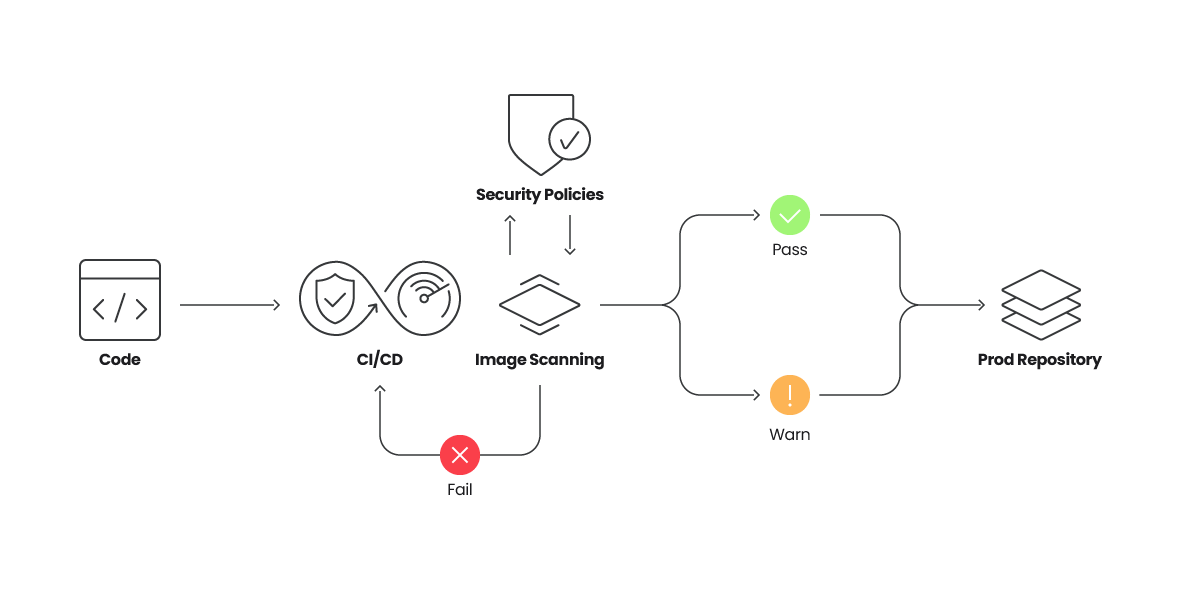
Image scanning is easy to automate and enforce. It can be included as part of your CI/CD pipelines, triggered when new images are pushed to a registry, or verified in a cluster admission controller to make sure that non-compliant images are now allowed to run. Another option is to scan images as soon as they start running.
4. Enforce image content trust
Container image integrity can be enforced by adding digital signatures via Notary or similar tools, which then can be verified in the Admission Controller or the container runtime.
Lets see a quick example:
$ docker trust key generate example1
Generating key for example1...
Enter passphrase for new example1 key with ID 7d7b320:
Repeat passphrase for new example1 key with ID 7d7b320:
Successfully generated and loaded private key. Corresponding public key available: /Users/airadier/example1.pub
Now, we have a signing key called “example1.” The public part is located in:
$HOME/example1.pub
and the private counterpart will be located in:
$HOME/.docker/trust/private/.key
Other developers can also generate their keys and share the public part.
Now, we enable a signed repository by adding the keys of the allowed signers to the repository (airadier/alpine in the example):
$ docker trust signer add --key example1.pub example1 airadier/alpine
Adding signer "example1" to airadier/alpine...
Initializing signed repository for airadier/alpine...
...
Enter passphrase for new repository key with ID 16db658:
Repeat passphrase for new repository key with ID 16db658:
Successfully initialized "airadier/alpine"
Successfully added signer: example1 to airadier/alpine
And we can sign an image in the repository with:
$ docker trust sign airadier/alpine:latest
Signing and pushing trust data for local image airadier/alpine:latest may overwrite remote trust data.
The push refers to repository [docker.io/airadier/alpine]
bc276c40b172: Layer already exists
latest: digest: sha256:be9bdc0ef8e96dbc428dc189b31e2e3b05523d96d12ed627c37aa2936653258c size: 528
Signing and pushing trust metadata
Enter passphrase for example1 key with ID 7d7b320:
Successfully signed docker.io/airadier/alpine:latest
If the DOCKER_CONTENT_TRUST environment variable is set to 1, then pushed images will be automatically signed:
$ export DOCKER_CONTENT_TRUST=1
$ docker push airadier/alpine:3.11
The push refers to repository [docker.io/airadier/alpine]
3e207b409db3: Layer already exists
3.11: digest: sha256:39eda93d15866957feaee28f8fc5adb545276a64147445c64992ef69804dbf01 size: 528
Signing and pushing trust metadata
Enter passphrase for example1 key with ID 7d7b320:
Successfully signed docker.io/airadier/alpine:3.11
We can check the signers of an image with:
$ docker trust inspect --pretty airadier/alpine:latest
Signatures for airadier/alpine:latest
SIGNED TAG   DIGEST                                                             SIGNERS
latest       be9bdc0ef8e96dbc428dc189b31e2e3b05523d9...   example1
List of signers and their keys for airadier/alpine:latest
SIGNER     KEYS
example1   7d7b320791b7
Administrative keys for airadier/alpine:latest
 Repository Key:       16db658159255bf0196...
 Root Key:             2308d2a487a1f2d499f184ba...
When the environment variable DOCKER_CONTENT_TRUST is set to 1, the Docker command-line interface (CLI) will refuse to pull images without trust information:
$ export DOCKER_CONTENT_TRUST=1
$ docker pull airadier/alpine-ro:latest
Error: remote trust data does not exist for docker.io/airadier/alpine-ro: notary.docker.io does not have trust data for docker.io/airadier/alpine-ro
You can enforce content trust in a Kubernetes cluster by using the Admission Controller.
5. Remediate common container security misconfigurations
Wrongly configured hosts, container runtimes, clusters, or cloud resources can leave a door open to an attack or create an easy option to escalate privileges and perform lateral movement.
The best way to remediate misconfigurations is through automation, which can be provided through a variety of different security tools. For example, static configuration analysis tools allow you to check configuration parameters at different levels, and they provide guidance in fixing them.
The Center for Internet Security (CIS) provides benchmarks you can compare your infrastructure against.
Other tools you can use include:
Example host benchmark control
A physical machine where you just installed Linux, a virtual machine (VM) provisioned on a cloud provider, or on-prem may contain several insecure out-of-the-box configurations that you are not aware of.
If you plan to use them for a prolonged period, with a production workload or exposure to the internet, you have to take special care of them. This is also true for Kubernetes or OpenShift nodes. After all, they are VMs; don't assume that if you are using a cluster provisioned by your cloud provider that they come perfectly secured.
CIS has a benchmark for Distribution Independent Linux, and one specifically for Debian, CentOs, Red Hat, and many other distributions.
Examples of misconfigurations you can detect:
Example securing containers runtime benchmark control
If you install container runtime orchestrator Docker by yourself in a server you own, it's essential you use a benchmark to make sure any default insecure configuration is remediated.
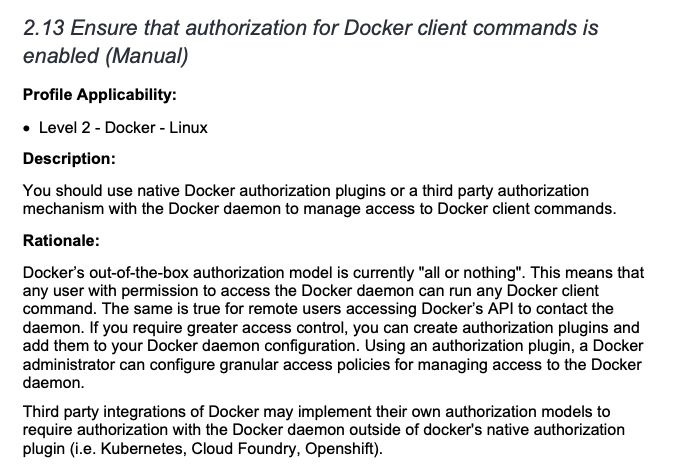
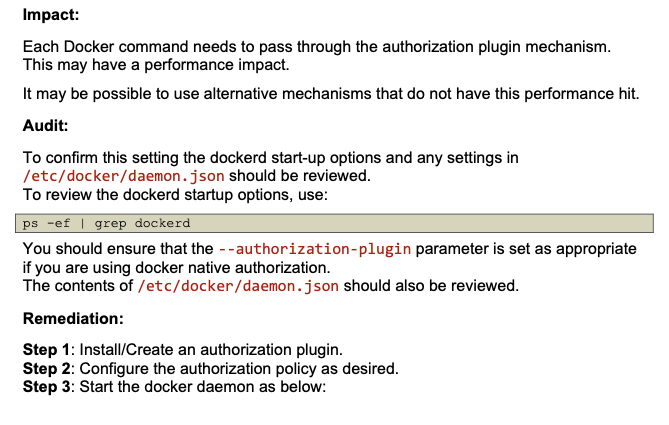
For example, you need to ensure that authorization for Docker client commands is enabled:

Example orchestrator benchmark control
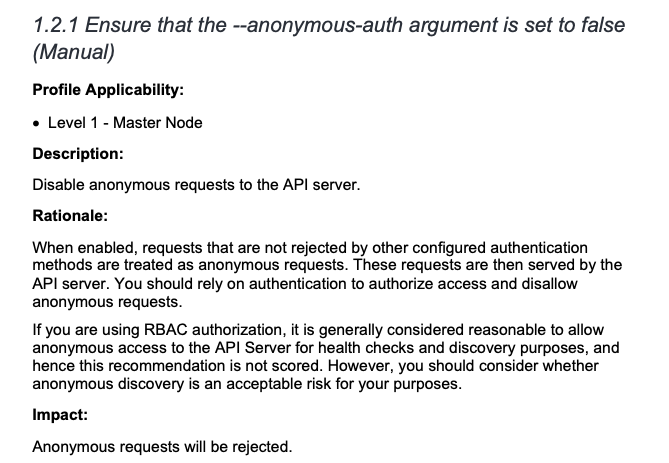
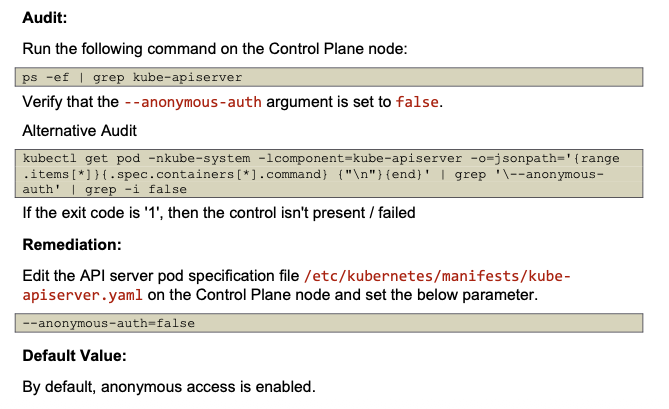
Kubernetes, by default, leaves many authentication mechanisms to be managed by third-party integrations. A benchmark will ensure all possible insecurities are dealt with. The image below shows us the configuration to ensure that the --anonymous-auth argument is set to false.
6. Incorporate IaC scanning and policy as code
Cloud resource management is a complex task, and tools like HashiCorp Terraform or AWS CloudFormation can help alleviate this burden.
Infrastructure is declared as code, stored and versioned in a repository, and automation takes care of applying the changes in the definition to keep the existing infrastructure up to date.
If you are using IaC, incorporate tools with IaC scanning capabilities to validate the configuration of your infrastructure before it is created or updated. Similar to other linting tools, apply IaC scanning tools locally and in your pipeline, and consider blocking changes that introduce security issues.
Policy as code is a related approach in which the policies governing container security, infrastructure, and more are defined and managed through code. This approach can be leveraged to automate compliance and governance across IaC and Kubernetes environments to ensure scalability and consistency across an organization.
Consider adopting container security tools that include IaC security capabilities. You can scan for misconfigurations across IaC tools, including Terraform, Helm, or YAML files, and map them back to the source.
From there, use Open Policy Agent (OPA), the OSS standard for policy management, to enforce consistent policies across multiple IaC sources and Kubernetes clusters.
7. Secure your host with host scanning
Securing your host is just as important as protecting containers. The host where the containers are running is usually composed of an operating system with a Linux kernel, a set of libraries, a container runtime, and other common services and helpers running in the background.
Any of these components can be vulnerable or misconfigured, and could be used as the entry point to access the running containers or cause a denial-of-service (DoS) attack.
For example, issues in the container runtime itself can impact your running containers. CVE-2021-20291 can be exploited through a DoS attack that prevents creating new containers in a host.
You can detect vulnerable components with a host scanning tool. It can detect known vulnerabilities in the kernel, standard libraries like glibc, services, and even container runtimes.
Use information gleaned from your host scanning tool to update the OS, kernel, packages, etc. Get rid of the most critical and exploitable vulnerabilities, or at least be aware of them, and apply other protection mechanisms, including:
- Firewalls.
- Restricting user access to the host.
- Stopping unused services.
8. Prevent unsafe containers from running
As a last line of defense, Kubernetes Admission Controllers can block unsafe containers from running in the cluster. While image scanning best practices can mitigate this issue, not everything you deploy will go through your CI/CD pipeline or known registries.
There are also third-party images and manual deployments. For example, you may skip protocol to perform a manual deploy in a rush, or an attacker with access to your cluster could deploy images.
With an Admission Controller, you can define policies to accept or block containers based on the pod specification (e.g., enforce annotations, detect privileged pods, or using host paths) and the status of the cluster (e.g. require all ingress hosts to be unique within the cluster).
Protection: how to run your containers safely
Adhering to build time and configuration container security best practices right before runtime still won't make your container 100% safe.
New container vulnerabilities are discovered daily, so your actual container could become a potential victim of new disclosed exploits tomorrow.
These container security best practices focus on improving your container runtime security.
1. Protect your resources
Your containers and host might contain vulnerabilities, and new ones are discovered continually. However, the danger is not in the host or container vulnerability itself, but rather the attack vector and exploitability.
For example, you can protect against an exploitable network vulnerability by preventing connections to the running container or the vulnerable service. If the attack vector requires local access to the host (being logged in the host), you can restrict the access to that host.
Limit the number of users who have access to your hosts, cloud accounts, and resources, and block unnecessary network traffic by using different mechanisms:
- Security groups, network rules, firewall rules, etc. in cloud providers to restrict communication between VMs, VPCs, and the internet.
- Firewalls at host level to expose only the minimal set of required services.
- Kubernetes Network Policies for clusters, and additional tools, like Service Mesh or API Gateways, can add an additional security layer for filtering network requests.
2. Verify image signatures
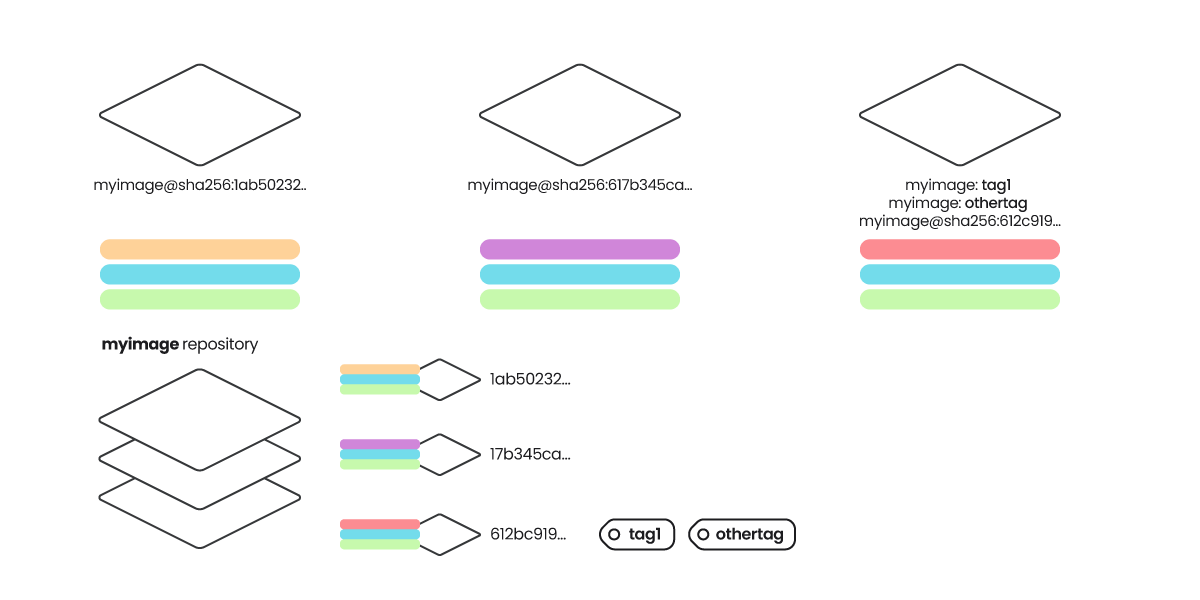
Image signatures are a protection mechanism to guarantee that the container image has not been tampered. Verifying image signatures can also prevent some attacks with tag mutability, assuring that the tag corresponds to a specific digest that has been signed by the publisher.
The figure below shows an example of this attack.
3. Restrict container privileges at runtime
The scope or "blast radius" of an exploited vulnerability inside a container largely depends on the privileges of the container, and the level of isolation from the host and other resources.
Runtime configuration can mitigate the impact of existing and future vulnerabilities in the following ways:
- Effective user ID: Don't run the container as root. Even better, use randomized UIDs (like Openshift) that don't map to real users in the host, or use the user namespace feature in Docker and in Kubernetes.
- Restrict container privileges: Docker and Kubernetes offer ways to drop capabilities and prevent privileged containers. Seccomp and AppArmor can add more restrictions to the range of actions a container can perform.
- Add resource limits: Prevent containers from consuming all the memory or CPU and starve other applications.
- Be careful with shared storage or volumes: Specifically, things like hostPath, and sharing the filesystem from the host.
- Define Pod Security Standards (PSS): Set guardrails in your cluster and prevent misconfigured containers. PSSs are admission controllers that will reject pods if their security context does not comply with defined policies.
4. Manage container vulnerabilities wisely
Manage and assess your vulnerabilities wisely. Not all vulnerabilities have fixes available or that can be applied quickly and easily.
However, not all vulnerabilities will be easily exploitable, or they may require local or even physical access to the hosts to be exploited.
Implement a good vulnerability management program that includes:
- Prioritize what needs to be fixed: Focus on host and container vulnerabilities in use at runtime. Addressing vulnerabilities not in your production environment wastes precious time that could be spent on critical vulnerabilities that actually put your organization at risk. Also, vulnerabilities without an active exploit are less risky than those being exploited by malicious actors right now. Only 1% of critical or high severity vulnerabilities have an available fix, have an active exploit, and are in use in production.
- Plan to apply fixes to protect containers and hosts: Create and track tickets, making vulnerability management part of your standard development workflows.
- Create exceptions for vulnerabilities that are not exploitable: This will reduce the noise. Consider snoozing instead of permanently adding an exception, so you can reevaluate later.
Your vulnerability management strategy should include using a container vulnerability scanner that can trigger alerts dependent upon specific criteria. Apply prevention and protection at different levels:
- Ticketing: Notify developers of detected vulnerabilities so they can remediate them.
- Image registry: Prevent vulnerable images from being pulled at all.
- Host / kernel / container: Block running containers or respond to threats by killing, quarantining or shutting down hosts or containers with critical issues.
It is also important to perform continuous vulnerability scanning and reevaluation to make sure that you get alerts when new vulnerabilities that apply to running containers are discovered.
Detection: Alerts for malicious or anomalous behavior
With prevention and protection in place, you should next focus on how to discover suspicious or anomalous behavior in containers..
1. Set up real-time event and log auditing
Threats to container security can be detected by auditing different sources of logs and events, and analyzing abnormal activity. Sources of events include:
- Host and Kubernetes logs.
- Cloud logs (AWS CloudTrail, Cloud Audit Logs in Google Cloud, etc.).
- System calls in containers.
Falco is capable of monitoring the executed system calls and generating alerts for suspicious activity. It includes a community-contributed library of rules, and you can create your own by using a simple syntax. Kubernetes audit log is also supported.
You can see nice examples of Falco in action in our Detecting MITRE ATT&CK articles:
As an example, the following rule would trigger an alert whenever a new ECS Task is executed in the account:
rule: ECS Task Run or Started
condition: aws.eventSource="ecs.amazonaws.com" and (aws.eventName="RunTask" or aws.eventName="StartTask") and not aws.errorCode exists
output: A new task has been started in ECS (requesting user=%aws.user, requesting IP=%aws.sourceIP, AWS region=%aws.region, cluster=%jevt.value[/requestParameters/cluster], task definition=%aws.ecs.taskDefinition)
source: aws_cloudtrail
description: Detect a new task is started in ECS.
Incident response and forensics
Once you detect a security incident is happening in your system, take action to stop the threat and limit additional harm. Instead of just killing the container or shutting down a host, consider isolating it, pausing it, or taking a snapshot.
A good forensics analysis will provide evidence to reveal what, when, and how the incident occurred. It is critical to identify:
- Was the security incident a real attack or just a component malfunction?
- What exactly happened, where did it occur, and are any other potentially impacted components?
- How can you prevent the security incident from happening again?
1. Isolate events and investigate
When a security incident is detected, you should quickly stop it first to limit any further damage.
Stop and snapshot: When possible, isolate the host or container. Container runtimes can "pause" the container (i.e., docker pause command) or take a snapshot and then stop it. For hosts, you might take a snapshot at the filesystem level, then shut it down. For EC2 or VM instances, you can also take a snapshot of the instance. Then, proceed to isolation. You can copy the snapshot to a safe sandbox environment, without networking, and resume the host or container.
Explore and forensics: Once isolated, you can ideally explore the live container or host, and investigate running processes. If the host or container is not alive, then you can just focus on the snapshot of the filesystem. Explore the logs and modified files. There are tools available that can greatly enhance forensics capabilities by recording all the system calls around an event and allowing you to explore even after the container or host is dead.
Kill the compromised container and/or host as a last resort: Simply destroying the suspicious activity will prevent any additional harm in the short term. But missing details about what happened will make it difficult to prevent it from happening again, and you can end up in a never ending whack-a-mole situation, repeatedly waiting for the next attack to happen just to kill it again.
2. Fix misconfigurations
Investigations should reveal what made the attack possible. Once you know the attack source, take security measures to prevent the attack from happening again. The cause of a host, container, or application being compromised can be a bad configuration, like excessive permissions, exposed ports or services, or an exploited vulnerability.
In the case of the former, fix the misconfigurations to keep it from happening again. In the latter case, it might be possible to prevent a vulnerability from being exploited (or at least limit its scope) by making changes in configurations, like firewalls, using a more restrictive user, and protecting files or directories with additional permissions or access control lists (ACL), etc.
If the issue impacts other assets in your environment, apply the fix in all of them. It's especially important to do so in those that might be publicly exposed if the exploit can be executed over a remote network connection.
3. Patch vulnerabilities
When possible, fix the vulnerability itself:
- For operating system packages (dpkg, rpm, etc.): First check if the distribution vendor offers an updated version of the package containing a fix. Just update the package or the container base image.
- For language packages, like NodeJS, Go, Java: Check for updated versions of the dependencies. Search for minor updates or patch versions that simply fix security issues if you can't spend additional time planning and testing for breaking changes that can happen on bigger version updates.
- For unpatched or unmaintained packages: It is still possible that a fix exists and can be manually applied or backported. This will require some additional work but it can be necessary for packages that are critical for your system and when there is no official fixed version yet. Check the vulnerability links in databases like NVD, vendor feeds and sources, public information in bug reports, etc. If a fix is available, you should be able to locate it.
If there is no fix available that you can apply on the impacted package, it might still be possible to prevent exploiting the vulnerability with configuration or protection measures (e.g., firewalls, isolation, etc.). Also, it might be complex and require a deep knowledge of the vulnerability, but you can add additional checks in your own code.
For example, a vulnerability caused by an overflow in a JSON processing library that is used by a web API server could be prevented by adding some checks at the HTTP request level, blocking requests that contain strings that could potentially lead to the overflow.
4. Close the loop
Unfortunately, host and container security is not “set once and forget” where you just apply a set of container security best practices once and never update. Software and infrastructure are evolving everyday, and so complexity increases and new errors are introduced. This leads to vulnerabilities and configuration issues. New attacks and exploits are discovered continuously.
Start by including prevention and security best practices. Then, apply protection measures to your resources, mostly hosts and workloads, but also cloud services. Continue monitoring and detecting anomalous behavior to take action, respond, investigate, and report the discovered incidents.
Forensics evidence will close the loop by fixing discovered vulnerabilities and improving protection to start over again. This includes:
- Rebuilding images.
- Updating packages.
- Reconfiguring resources.
- Creating incident reports.
In the middle, you need to assess risk and manage vulnerabilities. The number of inputs to manage in a complex and big environment can be overwhelming, so classify and prioritize to focus on the highest risks first.
Containers are a complex stack to secure
Containers' success is often fueled by two really useful features:
- They are a really convenient way to distribute and execute software, as a self-contained executable image which includes all libraries and dependencies, while being much lighter than classical VM images.
- They offer a good level of security and isolation by using kernel namespaces to execute processes in their own "jail,” including mounts, PID, network, IPC, etc., and also resource limiting CPU usage and memory via kernel cgroups. Memory protection, permission enforcement, etc. are still provided via the standard kernel security mechanisms.
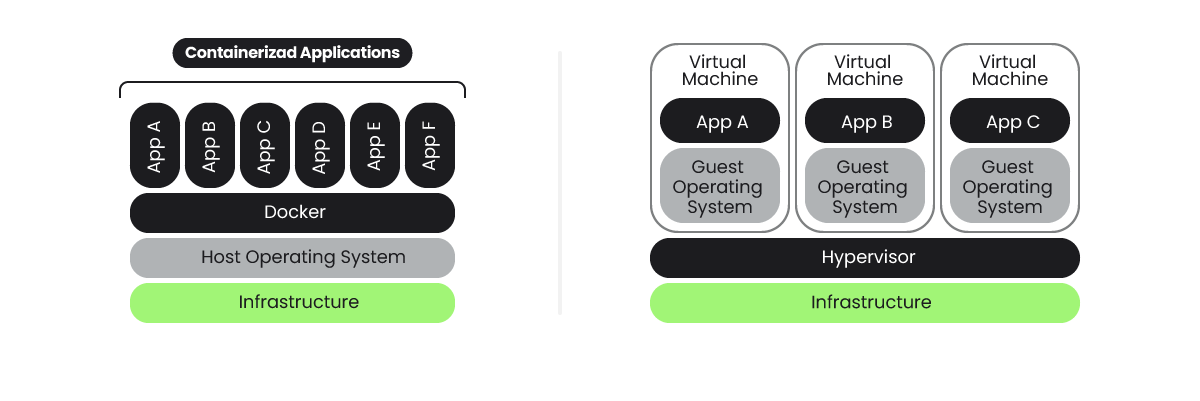
The container security model might be enough in most cases, but for example, AWS adds additional security for their serverless solution. It does so by running containers inside Firecracker, a micro virtual machine that adds another level of virtualization to prevent cross-customer breaches.
Containers were designed as a distribution mechanism for self-contained applications, allowing them to execute processes in an isolated environment. For isolation purposes, they employ a lightweight mechanism using kernel namespaces, removing the requirement of several additional layers in VMs, like a full operating system, CPU and hardware virtualization, etc.
The lack of these additional abstraction layers, as well as tightly coupling with the kernel, operating system, and container runtime, make it easier to use exploits to jump from inside the container to the outside and vice versa.
Does this mean containers are not safe?
You can see it as a double-edged sword.
An application running inside a container is no different than an application running directly in a machine, sharing a filesystem and processes with many other applications. In a sense, they are just applications that could contain exploitable vulnerabilities.
Running inside a container won't prevent this, but will make it much harder to jump from the application exploit to the host system, or access data from other applications.
On the other hand, containers depend on another set of kernel features, a container runtime, and usually a cluster or orchestrator that might be exploited too.
So, we need to take the whole stack into account, and we can apply container security best practices at the different phases of the container lifecycle. Let's reflect these two dimensions in the following diagram and focus on the practices that can be applied in each block:
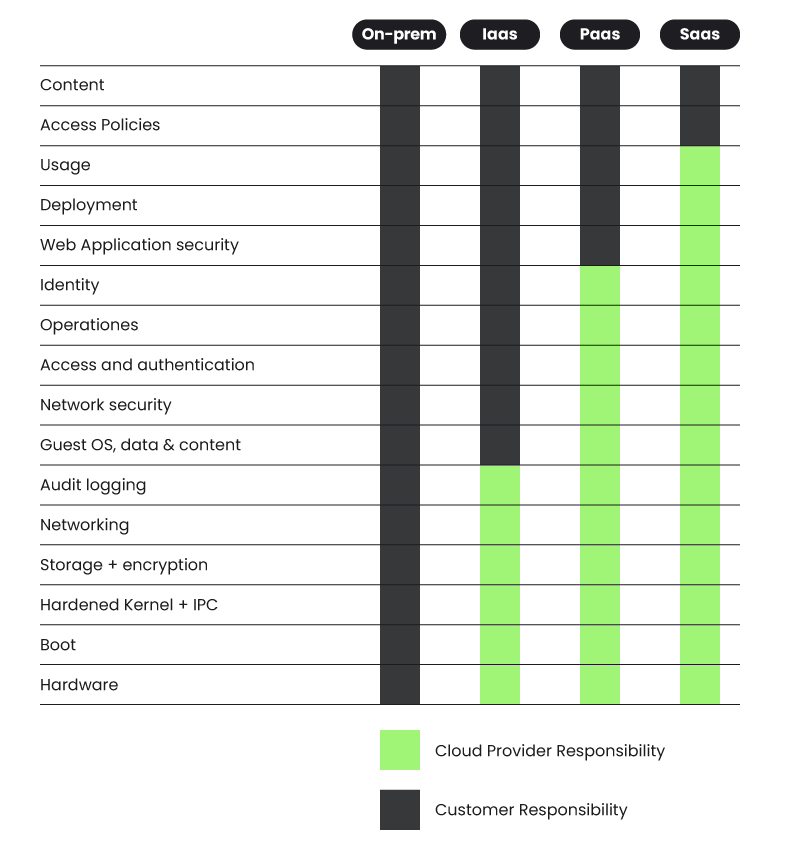
There will be cases like the serverless compute engine ECS Fargate, Google Cloud Run, etc., where some of these pieces are out of your control based on the shared responsibility model:
- The cloud service provider (CSP) is responsible for keeping the base pieces working and secured.
- You can focus on the upper layers.
Secure your containers with Sysdig
Container threats move fast and traditional security tools can create visibility gaps if you use containers and Kubernetes frequently.
With Sysdig container security, you get cloud-native security to stay ahead of threats, prioritize risks that actually impact your organizations, and understand the context around vulnerabilities and threats.

Top 5 use cases for securing cloud and containers
Keep your containers safe, while keeping up with the speed of innovation.